EDA Libraries & Dependencies
Core tools used for text inspection, statistical summaries, and visualization.
TfidfVectorizer converts raw SMS text into weighted lexical features and ranks spam/ham-specific terms.Raw Fields & Engineered EDA Features
The notebook extends the original SMS dataset with interpretable text statistics and pattern flags.
| Field / Feature | Type | Role in the EDA Notebook |
|---|---|---|
label | Target | Binary class indicating whether a message is ham or spam. |
text | Raw text | The SMS body used for lexical analysis, word clouds, TF-IDF, n-grams, and downstream sequence modeling. |
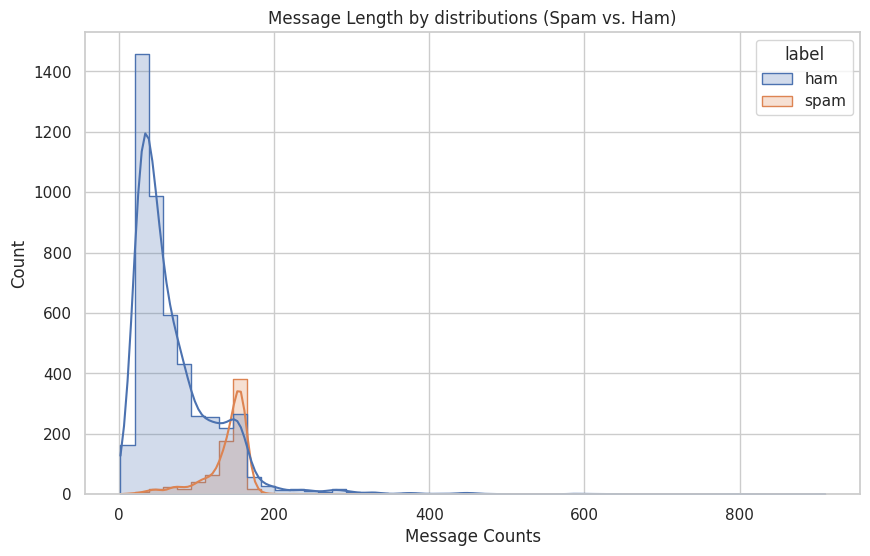
text_length, char_count, word_count | Numeric | Length descriptors showing that spam messages are typically longer and denser than ham messages. |
punct_count, num_count, upper_count, emoji_count, num_numbers | Numeric | Surface-level text features that highlight promotional formatting, numerical codes, and punctuation-heavy spam behavior. |
has_url, has_phone, has_email | Boolean | Regex-based detection signals for external contact / redirection patterns common in unsolicited messages. |
duplicate_texts and spam-specific vocabulary | Analytical | Used to reveal repeated campaigns, shared templates, and uniquely spam-oriented vocabulary. |
EDA Pipeline From Raw Messages to Text Signals
The notebook moves from descriptive statistics to semantic and pattern-based analysis.
v1 and v2, and rename them to label and text.char_count and word_count, then compute overall and per-class descriptive summaries.What the Numbers Say About Spam vs Ham
The strongest quantitative contrasts appear in message length, numeric content, and redirection patterns.
Spam is much longer
The notebook reports 71.02 average characters and 14.20 average words for ham, versus 138.87 characters and 23.85 words for spam. That means spam messages are almost twice as long on average and carry more packed information per message.
Spam contains far more machine-like artifacts
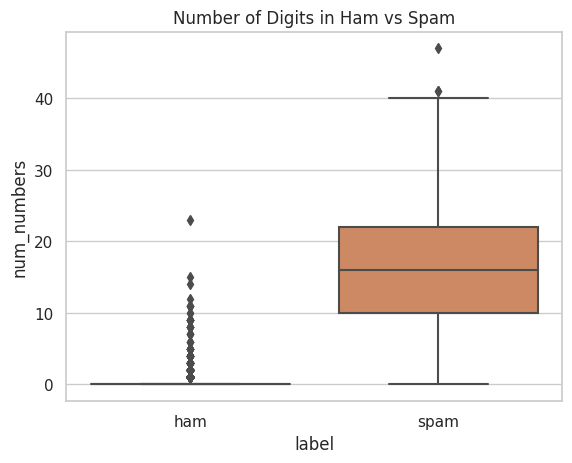
Regex-based checks show 104 spam URLs against only 2 ham URLs, 18 spam emails against 2 ham emails, and an average of 15.76 digits per spam message versus only 0.30 for ham.
Duplicate message behavior is visible
The notebook finds 684 duplicated texts, which is consistent with mass-sent campaigns and template-driven promotional spam. This is a useful operational clue because spam often scales by repeating a few message forms.
Everyday speech vs incentive language
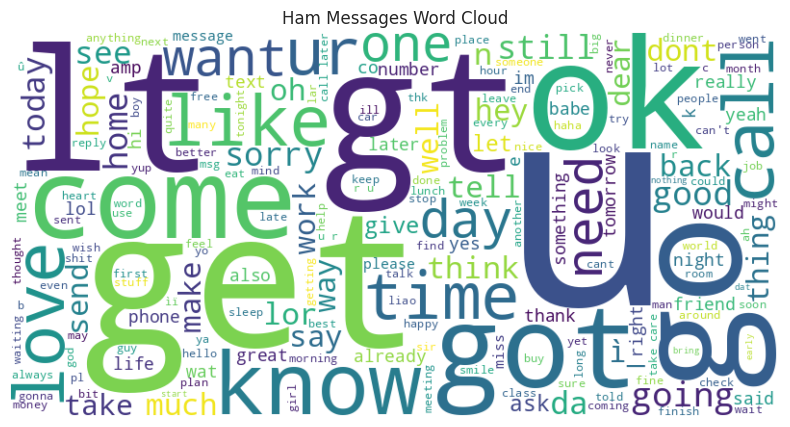
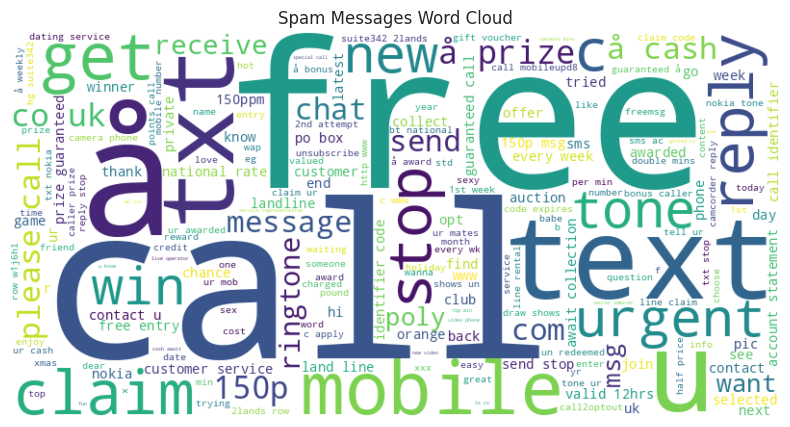
Common ham tokens include u, go, come, know, and good. In contrast, spam heavily features call, free, txt, mobile, claim, and reply.
EDA Visual Evidence
The notebook’s plots show class imbalance, structural differences, and the token-level contrast between spam and ham.
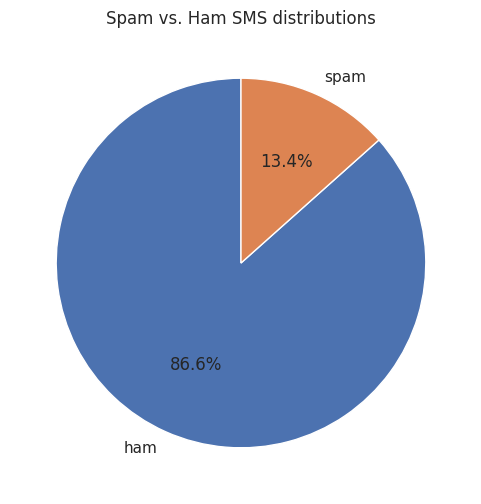
These figures show the dataset skew toward ham and demonstrate how message length and digit density shift for spam.
The clouds reveal the underlying language style of the two classes: casual personal texting for ham, incentive and redirection language for spam.
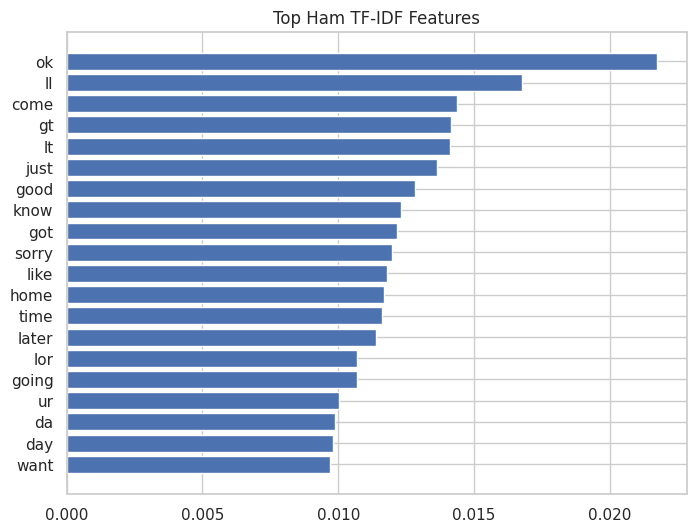
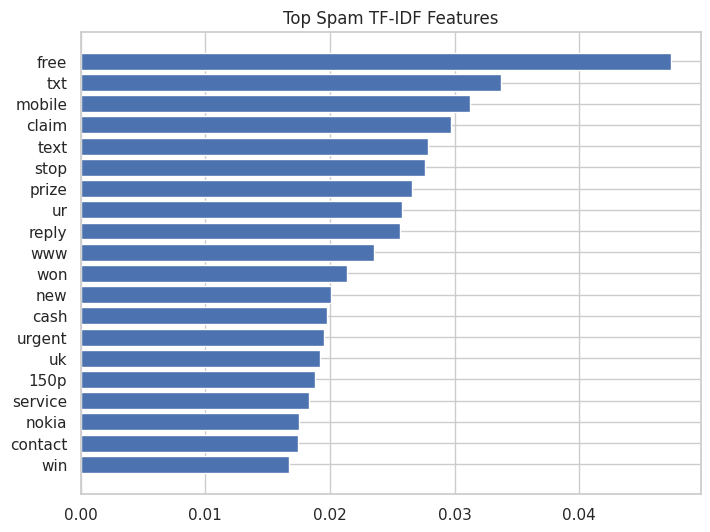
These bar charts summarize the most discriminative TF-IDF features in each class, making the lexical split more explicit.
TF-IDF & N-gram Takeaways
The notebook captures both broad vocabulary differences and high-value spam phrases.
Top ham indicators
Ham TF-IDF is dominated by conversational tokens such as ok, ll, come, just, good, know, home, and later. These words reflect everyday coordination, social interaction, and informal speech.
- Common bigrams:
ll later,let know,good morning - Common trigrams:
sorry ll later,happy new year
Top spam indicators
Spam TF-IDF is strongly anchored by free, txt, mobile, claim, prize, reply, won, cash, and urgent. These are classic conversion-oriented spam terms.
- Common bigrams:
po box,1000 cash,prize guaranteed - Common trigrams:
draw shows won,private 2003 account,urgent trying contact
Representative Feature Engineering Code
A compact excerpt showing how the notebook engineers structural features and TF-IDF summaries.
# structural text features
df['char_count'] = df['text'].astype(str).apply(len)
df['word_count'] = df['text'].astype(str).apply(lambda x: len(x.split()))
df['num_numbers'] = df['text'].str.count(r'\d')
df['has_url'] = df['text'].str.contains(r'https?://\S+|www\.\S+', regex=True)
df['has_email'] = df['text'].str.contains(r'\S+@\S+', regex=True)

# class-wise TF-IDF diagnostics
tfidf = TfidfVectorizer(stop_words='english', max_features=5000)
tfidf_matrix = tfidf.fit_transform(df['text'])
features = tfidf.get_feature_names_out()

spam_tfidf_mean = tfidf_matrix[(df['label'] == 'spam').values].mean(axis=0).A1
ham_tfidf_mean  = tfidf_matrix[(df['label'] == 'ham').values].mean(axis=0).A1

def top_terms(scores, features, k=20):
    idx = np.argsort(scores)[-k:][::-1]
    return [(features[i], scores[i]) for i in idx]
Exploration Conclusions
The EDA notebook establishes why spam detection is both a lexical and structural classification problem.
Class imbalance is real: spam represents only about 13.41% of the corpus, which makes imbalance-aware modeling essential.
Spam looks different at multiple levels: it is longer, more numeric, more repetitive, and more likely to contain URLs, marketing phrases, and urgency-driven wording.
EDA directly informs modeling: the later notebook’s use of class_weight, controlled sequence length, and learned vocabulary is strongly supported by the exploratory evidence gathered here.
Modeling Libraries & Dependencies
Main libraries behind tokenization, sequence modeling, hyperparameter search, and training diagnostics.
TextVectorization, StringLookup, Embedding, Bidirectional LSTM, callbacks, metrics, and tf.data pipelines.From Raw Strings to Binary Predictions
The modeling notebook organizes preprocessing, tuning, and final training as a staged NLP pipeline.
train_test_split using TEST_SPLIT_RATIO = 0.2 and stratification to preserve class balance.TextVectorization, encode targets with StringLookup, and build optimized tf.data pipelines.{0: 0.5774, 1: 3.7296}, giving more importance to spam examples during training.EarlyStopping, ReduceLROnPlateau, and ModelCheckpoint.Core Modeling Theory
The notebook combines neural sequence modeling with binary decision theory and Bayesian search.
TextVectorization is mapped into a dense semantic vector. In the best run, the learned embedding dimension is 16.LSTM Cell Intuition
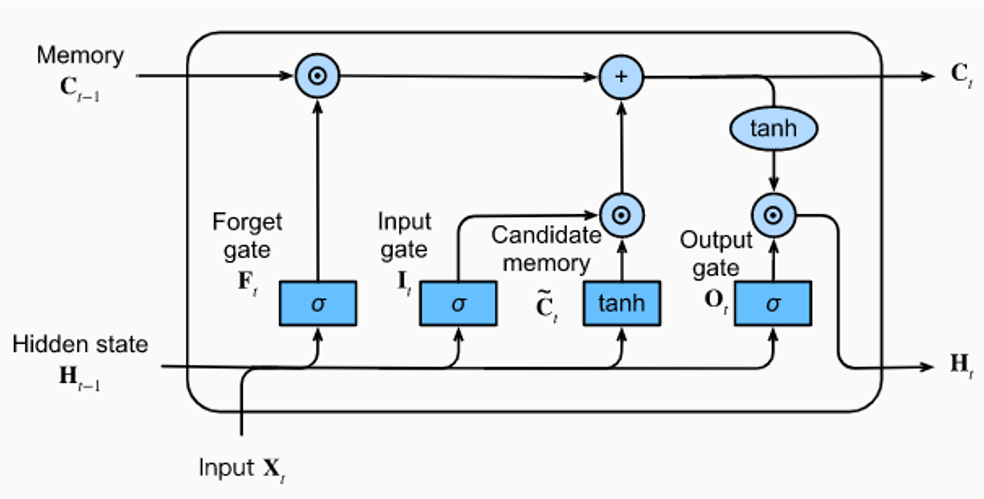
The provided diagram highlights the gating structure that lets LSTMs manage long-range sequence memory.
Model Parameters & Training Controls
The notebook keeps the configuration explicit and reproducible across preprocessing, search, and final training.
| Component | Chosen Value | Why It Matters |
|---|---|---|
MAX_LENGTH | 100 | Every SMS is padded or truncated to a fixed sequence length, making batching consistent. |
VOCAB_SIZE | 10000 (actual learned size: 8439) | Caps vocabulary growth while still preserving most useful tokens in the corpus. |
BATCH_SIZE | 128 | Used in the optimized tf.data pipeline for throughput and stable updates. |
Train / Validation Split | 80% / 20% | Provides a held-out set for tuning and callback-driven training decisions. |
Best Embedding Dim | 16 | Compact semantic representation learned jointly with the classifier. |
Best LSTM Units | 16 | Controls sequence modeling capacity in the Bi-LSTM encoder. |
Best Dense Head | 1 dense layer with 128 units | Acts as the final nonlinear decision layer before binary prediction. |
Best Dropout Rate | 0.4442 | Regularizes the post-LSTM representation and reduces overfitting. |
Best Learning Rate | 0.0003231 | Tuned to balance convergence speed and stability. |
Best Weight Decay | 0.0006193 | Supports generalization by softly penalizing overly large weights. |
Hyperparameter Search & Final Performance
Optuna identifies the champion model, then the final training stage sharpens its validation performance.
AUC, with best validation AUC values around 0.99. Combined with class weighting, this shows the model is not simply learning the majority class but genuinely separating spam from ham.Key Modeling Code Snippets
Two excerpts capture the pipeline’s transformation logic and the final neural architecture.
# learn the vocabulary from raw training text
def text_vectorize(train_dataset):
    vectorizer = tf.keras.layers.TextVectorization(
        max_tokens=10000,
        output_sequence_length=100,
        standardize='lower_and_strip_punctuation'
    )
    text_only_dataset = train_dataset.map(lambda text, label: text).batch(64)
    vectorizer.adapt(text_only_dataset)
    return vectorizer

# encode text + labels and optimize the tf.data pipeline
def preprocessing(dataset, text_vectorizer, label_encoder):
    dataset = (dataset
        .map(lambda text, label: (text_vectorizer(text), label_encoder(label)))
        .filter(lambda x, y: tf.shape(x)[0] == 100)
        .shuffle(1024)
        .batch(128, drop_remainder=True)
        .prefetch(tf.data.AUTOTUNE)
    )
    return dataset
def create_final_model(hparams):
    inputs = tf.keras.Input(shape=(100,))
    x = tf.keras.layers.Embedding(10000, hparams['embedding_dim'])(inputs)
    x = tf.keras.layers.Bidirectional(
        tf.keras.layers.LSTM(hparams['lstm_units'])
    )(x)
    x = tf.keras.layers.Dropout(hparams['dropout_rate'])(x)

    for i in range(hparams['num_dense_layers']):
        units = hparams[f'dense_layers_{i}']
        x = tf.keras.layers.Dense(units, activation='relu')(x)

    outputs = tf.keras.layers.Dense(1, activation='sigmoid')(x)
    return tf.keras.Model(inputs, outputs)

optimizer = tf.keras.optimizers.AdamW(
    learning_rate=3.230576384522256e-4,
    weight_decay=6.193087602825927e-4
)
Callback Design & Robust Optimization
The notebook protects the final model with early stopping, checkpointing, learning-rate decay, and TensorBoard logging.
EarlyStopping
The notebook monitors val_loss with patience=10 and restores the best weights, preventing the network from drifting after its strongest validation phase.
ModelCheckpoint
The best-performing checkpoint is saved to SMS_Spam_best_model.keras, ensuring that the lowest-validation-loss model survives regardless of how later epochs behave.
ReduceLROnPlateau
Whenever validation loss stalls, the learning rate is multiplied by 0.3, which helps the model settle into a better local optimum rather than oscillating.
TensorBoard logging
Training histories are exported to TensorBoard logs so the run can be inspected, compared, and audited beyond just the final metric snapshot.
Final Conclusion & Performance Summary
The modeling notebook turns the EDA findings into a strong, well-regularized sequence classifier.
End-to-end result: the project advances from raw SMS strings to a tuned Bidirectional LSTM with 98.87% best validation accuracy and a best recorded validation loss of 0.0564.
Why it works: the model design aligns closely with the EDA findings — it respects class imbalance, leverages tokenized sequential context, and optimizes for minority-class sensitivity with precision / recall monitoring.
Engineering takeaway: this notebook is more than a simple baseline. It demonstrates a clean NLP workflow with dataset splitting, vocabulary learning, label encoding, TensorFlow data pipelines, Optuna tuning, callback-driven convergence, and saved checkpoint artifacts.
Possible next steps:
- Compare the Bi-LSTM against GRU, CNN-text, or Transformer baselines.
- Evaluate threshold tuning for spam recall vs false positives.
- Export the saved model and preprocessing artifacts for a lightweight inference API.
- Test character-level or subword tokenization for noisy SMS variants.
From HTTP Request to Persisted Prediction
Inference and persistence are deliberately separated into middleware, route, predictor, service, and repository layers.
16,384 bytes, and request-ID middleware assigns a UUID returned in the X-Request-ID response header.PredictRequest strips surrounding whitespace and rejects empty or oversized SMS input before inference begins.0.5.label and spam_probability; internal ciphertext and database details never leave the backend.Routes, Startup Gates & Failure Boundaries
The API fails early when artifacts or secrets are invalid and returns consistent, traceable responses during normal operation.
| Surface | Purpose | Production Behavior |
|---|---|---|
GET / | Metadata | Returns the service name, version 1.0.0, and the OpenAPI documentation path at /docs. |
GET /health | Readiness | Executes a PostgreSQL readiness query, so Render only treats the service as healthy when the API and database path both work. |
POST /predict | Inference | Classifies one validated SMS, saves an encrypted record, and returns the label plus spam probability. |
| Application lifespan | Startup | Validates artifact paths, creates and warms the predictor, verifies the Fernet key, and disposes pooled database connections on shutdown. |
| Error handlers | Safety | Translate validation, encryption, inference, and persistence failures into a stable error envelope without leaking plaintext or internal exception details. |
Inference Architecture & Configuration Snapshot
The deployed backend is intentionally smaller than the research environment: three model artifacts, one ONNX session, one database pool, and one encrypted write per prediction.
Route, Lifespan & Safe Error Code
Representative production code shows where inference is validated, where dependencies are warmed, and how internal exceptions become stable client responses.
@router.post("/predict")
def predict(payload, request, session):
    result = PredictionResponse.model_validate(
        request.app.state.predictor.predict(payload.text)
    )
    PredictionService(
        session=session,
        repository=PredictionRepository(session),
        message_cipher=request.app.state.message_cipher,
    ).save_prediction(
        request_id=UUID(request.state.request_id),
        message=payload.text,
        label=result.label,
        spam_probability=result.spam_probability,
        threshold=request.app.state.predictor.threshold,
    )
return result@asynccontextmanager
async def lifespan(app):
validate_artifact_paths()
predictor = create_predictor()
warmup_predictor(predictor)
cipher = MessageCipher(
AppConfig.get_message_encryption_key()
)
app.state.predictor = predictor
app.state.message_cipher = cipher
try:
yield
finally:
database.dispose()| Failure | Public Status | Stable Code | What Remains Private |
|---|---|---|---|
| Invalid request | 422 | validation_error | Framework internals and rejected data beyond safe field feedback. |
| Oversized body | 413 | request_too_large | Buffered body content. |
| Inference failure | 503 | prediction_unavailable | Model exception and stack trace. |
| Persistence failure | 503 | persistence_unavailable | SQL, credentials, parameters, and submitted plaintext. |
| Readiness failure | 503 | database_unavailable | Neon hostname, driver exception, and connection details. |
The predictions Record
The schema keeps the minimum useful audit metadata while protecting the submitted message body.
| Column | Type / Constraint | Reason |
|---|---|---|
id | Integer PK | Internal database identity for the prediction row. |
request_id | Unique UUID | Correlates the database record with the API response and request logs while preventing duplicate request records. |
message_ciphertext | LargeBinary | Stores authenticated Fernet bytes; plaintext is never sent to PostgreSQL. |
label | ham / spam | A check constraint restricts the public classification to the two supported labels. |
spam_probability | Float 0–1 | Preserves the model confidence used to form the public result. |
threshold | Float 0–1 | Records the exact decision boundary used at prediction time. |
message_length | Positive integer | Retains safe operational metadata without exposing message content. |
created_at | Timezone timestamp | Uses the PostgreSQL server clock for a consistent creation time. |
Pooled Runtime, Direct Migrations & Reversible Encryption
The application and deployment workflow use different connection modes for different jobs, while one protected key governs message recovery.
NEON_DIRECT_DATABASE_URL and runs alembic upgrade head before asking Render to deploy application code.MESSAGE_ENCRYPTION_KEY; losing or rotating it without a migration makes old ciphertext unreadable.alembic check, persists a smoke-test prediction, and queries the table to confirm the row exists.Separation of responsibilities: Neon owns durable PostgreSQL operation, Alembic owns schema evolution, SQLAlchemy owns application transactions, and Fernet protects sensitive message content before storage.
Important operational rule: database URLs and the encryption key remain environment secrets. They belong in local uncommitted .env files or host secret stores, never in Git history or browser code.
Local PostgreSQL, Neon Pooling & Alembic Direct Access
Three connection contexts use the same schema but different lifecycles: persistent local development, pooled web traffic, and short-lived migration sessions.
A named volume preserves developer data. The migrate container waits for pg_isready, upgrades to Alembic head, exits successfully, and only then allows the API to start.
The Render API uses Neon’s pooler hostname. SQLAlchemy adds pool_pre_ping, a bounded pool checkout timeout, a network connect timeout, and hidden parameters in engine logs.
GitHub Actions uses the direct production URL with Alembic’s NullPool. The connection exists only for schema work and is closed before Render deployment begins.
postgres:// and postgresql:// provider URLs are normalized to postgresql+psycopg://, keeping deployment configuration compatible with SQLAlchemy 2.
| Context | Connection Strategy | Lifetime | Failure Policy |
|---|---|---|---|
| API request | Pooled engine + request-scoped session | Session closes after request; engine survives process | Rollback incomplete work and return safe 503. |
| Health check | SELECT 1 through engine | One round trip per readiness probe | Service becomes unhealthy if PostgreSQL cannot answer. |
| Local migration | Compose migrate service | One-shot container | API dependency remains blocked on non-zero exit. |
| Production migration | Direct Neon URL + NullPool | One GitHub Actions step | Render hooks are never called when Alembic fails. |
Encryption, Transactions & Useful SQL
The data path makes plaintext exposure difficult by construction and keeps enough metadata for auditing, debugging, and aggregate monitoring.
ciphertext = message_cipher.encrypt(message)
try:
    prediction = repository.create(
        request_id=request_id,
        message_ciphertext=ciphertext,
        label=label,
        spam_probability=probability,
        threshold=threshold,
        message_length=len(message),
    )
    session.commit()
except SQLAlchemyError:
    session.rollback()
    raise PersistenceError(
        "Prediction transaction failed."
)SELECT
request_id,
label,
ROUND(spam_probability::numeric, 4) AS probability,
threshold,
message_length,
octet_length(message_ciphertext) AS cipher_bytes,
created_at
FROM predictions
ORDER BY created_at DESC
LIMIT 25;One Interface for Prediction, Data & Training Context
The UI turns a simple classifier endpoint into an explorable product without moving training or inference logic into the browser.
/api/predict; Nginx removes the prefix and forwards the request securely to the Render API host, avoiding client-side production host configuration.Desktop Shell, Mobile Navigation & Interaction States
The interface adapts its navigation and detail surfaces while preserving keyboard access, readable contrast, and explicit feedback.
Three-area application shell
A persistent sidebar orders App, Datasets, Training; the central canvas holds the active workspace; and a right inspector presents the selected prediction or research context.
Compact route navigation
The layout removes desktop-only chrome, keeps core actions reachable, and converts secondary detail into a mobile-friendly sheet or stacked section without horizontal page overflow.
Keyboard and semantic controls
Interactive icons have names or tooltips, focus remains visible, routes are keyboard reachable, the search shortcut uses a single-line K hint, and live result states remain understandable without color alone.
Dark, light & high contrast
Theme controls preserve legibility across neutral surfaces, status colors, cards, charts, borders, and focus indicators while respecting reduced-motion preferences in tested interactions.
Honest server-state feedback
The API badge, loading action, validation message, error state, probability result, persistence confirmation, and request ID make each stage of a prediction visible to the user.
Source, notebooks & research
Header links connect the deployed product to the application repository, training notebooks, and this research page without mixing those destinations into primary navigation.
Prediction UX From Idle to Result or Recovery
The frontend treats prediction as a visible state machine, not a single button click, so latency and free-tier wake-up behavior remain understandable.
Health polling reports a ready service, the composer is enabled, example chips can populate the textarea, and the current message count remains visible.
The UI explains that the API may be waking and does not pretend the browser or model has failed permanently. A later health refresh can recover naturally.
The result region announces “Spam detected,” emphasizes the probability, places it against the threshold, confirms encrypted persistence, and exposes the correlation ID.
A friendly alert appears without clearing the textarea, letting the user retry after a temporary API or storage failure instead of re-entering the message.
Typed API Boundary, Responsive Contract & Privacy
The browser knows the public contract, while Nginx owns production routing and the backend owns model and persistence logic.
const predictionSchema = z.object({
  label: z.enum(["ham", "spam"]),
  spam_probability: z.number().min(0).max(1),
});

export async function createPrediction(text: string) {
  const response = await fetch("/api/predict", {
    method: "POST",
    headers: { "Content-Type": "application/json" },
    body: JSON.stringify({ text }),
  });
  const result = predictionSchema.parse(
    await response.json()
  );
  return {
    ...result,
    requestId: response.headers.get("x-request-id"),
  };
}Desktop icon rail + labeled sidebar main workspace + right inspector sidebar can be hidden and restored Mobile desktop rail hidden compact primary navigation visible cards become one-column selected details open as a sheet touch targets remain at least 44px All viewports App → Datasets → Training dark → light → high contrast K focuses global search
| Frontend Data | Lifetime | Storage Location | Privacy Decision |
|---|---|---|---|
| Typed SMS text | Current interaction | React component memory | Sent to the API only when the user submits. |
| Prediction metadata | Current page session | In-memory activity list | Label, probability, time, and request ID can be shown without retaining plaintext. |
| Original message | Server-side durable record | Neon as Fernet ciphertext | Never written to browser storage or rendered in history. |
| Theme | Device preference | UI state | Non-sensitive presentation preference only. |
| Research metrics | Build-time static | Frontend bundle | Public notebook-derived facts; no database request needed. |
What Each Test Layer Proves
Every layer answers a different reliability question, from a pure function to the full Docker Compose stack.
| Layer | Main Scope | Failure It Catches |
|---|---|---|
| Backend unit tests | Pure behavior | Text normalization drift, invalid artifact metadata, threshold mistakes, cipher errors, and configuration edge cases. |
| API tests | HTTP contract | Wrong status codes or response shapes, missing request IDs, validation regressions, body-limit failures, and unsafe error leakage. |
| Database integration | Persistence | Broken migrations, invalid constraints, failed commits or rollbacks, duplicate request IDs, and missing encrypted prediction rows. |
| Frontend unit/component | Interaction | Broken routing, inaccessible controls, stale loading states, malformed API handling, missing prediction results, and incorrect theme behavior. |
| Browser & accessibility | User journey | Desktop/mobile layout regressions, failed real-browser navigation, focus and semantic issues, and detectable WCAG A/AA violations. |
| Deployment smoke | Containers | Images that build but cannot start together, migrations that do not complete, unhealthy services, broken prediction calls, or absent database persistence. |
Test Isolation, Real Dependencies & Deployment Gates
Fast tests remain isolated, integration tests use disposable infrastructure, and production cannot deploy until both paths pass.
.env.example.npm ci, Vitest, the TypeScript/Vite production build, Playwright Chromium, and axe checks run as an independent job.Gate design: production deployment depends on the runtime tests, frontend tests, and composed deployment smoke test. A green isolated test suite alone is not enough.
Representative verified frontend scope: unit/component tests cover navigation and prediction behavior, while Playwright covers applicable desktop and mobile journeys with intentional viewport-specific skips where appropriate.
Repository Coverage by Concern
The suite contains 91 declared Python and TypeScript test cases across API, integration, unit, smoke, component, browser, responsive, and accessibility concerns.
| Area | Representative Files | Important Assertions |
|---|---|---|
| API | test_predict.py, test_health.py, test_error_handling.py | Success contract, schema limits, request IDs, 413 body cap, safe 503 shapes, and readiness. |
| ML runtime | test_predictor.py, test_onnx_model.py, test_artifacts.py | Artifact integrity, preprocessing agreement, valid probabilities, threshold logic, and portable runtime imports. |
| Persistence | test_database_persistence.py, test_prediction_repository.py, test_prediction_service.py | Encrypted writes, lookup paths, commits, rollbacks, constraints, and error translation. |
| Security/config | test_message_cipher.py, test_config.py, test_environment_template.py | Fernet round trips, invalid tokens, required secrets, URL normalization, and safe example configuration. |
| React component | App.navigation.test.tsx, App.prediction.test.tsx | Route order, search shortcut, themes, sidebar state, links, pending/result/error states, and malformed responses. |
| Browser | e2e/app.spec.ts | Desktop/mobile navigation, full prediction journey, mobile details sheet, and WCAG A/AA scans in three themes. |
Behavior Tests & Developer Shortcuts
Tests describe product behavior in readable code, while Makefile targets keep local execution aligned with CI.
it("renders a spam prediction", async () => {
  server.use(
    http.post("*/api/predict", () =>
      HttpResponse.json(
        { label: "spam", spam_probability: 0.9123 },
        { headers: { "x-request-id": requestId } },
      ),
    ),
  );

  await user.type(messageBox, "Claim your free prize");
  await user.click(analyzeButton);

  expect(await screen.findByText("Spam detected"))
    .toBeVisible();
  expect(screen.getByText("Encrypted record saved"))
    .toBeVisible();
});make test-unit make test-api make test-integration make test-smoke make test-local make frontend-test make frontend-test-watch make frontend-test-e2e make frontend-check docker compose config --quiet docker compose up --build --wait
Mock only the network edge
MSW returns realistic JSON and headers while React Query, Zod, rendering, events, and application state remain real. This catches client bugs without depending on a sleeping host.
Use real PostgreSQL where it matters
Database tests and deployment smoke tests run against PostgreSQL rather than replacing SQLAlchemy behavior with a mock that could hide migration or dialect problems.
Combine automation with semantics
Testing Library queries by roles and names, Playwright checks real viewport behavior, and axe finds detectable violations across dark, light, and high-contrast themes.
Test the shipped model contract
The suite loads checked-in ONNX and preprocessing artifacts so CI can detect missing files, incompatible metadata, or runtime-only import regressions before image deployment.
From Commit to Production Release
Independent runtime and frontend checks converge on a deployable-stack smoke test before the production job receives control.
main, pull request to main, or authorized manual dispatch starts the same declared pipeline.runtime-tests validates Python, migrations, and API behavior while frontend-tests validates React, the production build, browser flows, and accessibility.deployment-smoke depends on both CI jobs, builds the API image once, starts the stack, confirms the migration exit code, sends a prediction, and checks persistence.alembic upgrade head, and reports the current Neon revision.Production Inputs, Concurrency & Ownership
Sensitive values remain in scoped secret stores, while committed files define only names, defaults, and reproducible release behavior.
| Secret / Control | Used By | Role |
|---|---|---|
MESSAGE_ENCRYPTION_KEY | Tests & API | Initializes Fernet for encrypted persistence; the real value is never committed. |
NEON_DIRECT_DATABASE_URL | Production migration | Connects Alembic directly to Neon before any Render release begins. |
RENDER_API_DEPLOY_HOOK_URL | CD | Starts the API build only after successful production migration. |
RENDER_FRONTEND_DEPLOY_HOOK_URL | CD | Starts the Nginx/React frontend build after all release checks pass. |
production environment | GitHub | Scopes deployment credentials and provides a natural place for future reviewers or approval rules. |
| Concurrency group | Release ordering | cancel-in-progress: false prevents a newer run from interrupting an in-flight production migration or deployment. |
| Render auto-deploy off | Render | Prevents Render from bypassing GitHub Actions and deploying code before tests or Alembic complete. |
Why the workflow is unified: CI and CD live in one dependency graph, so the production job cannot accidentally run without the exact runtime, frontend, and container checks defined for the same commit.
Why migrations are not a permanent service: Alembic is a one-shot release action. It runs whenever a schema-changing version is deployed; if no code changes for months, there is no new schema to apply.
Parallel Validation, Converged Smoke Test, Serialized Release
The workflow is a dependency graph: two fast quality branches meet at a real container test, and only that combined result can unlock production.
Triggers, Dependencies & Migration-First CD
The workflow file makes release policy executable instead of relying on a manual checklist.
name: CI/CD

on:
  push:
    branches: [main]
  pull_request:
    branches: [main]
  workflow_dispatch:

jobs:
  runtime-tests:
  frontend-tests:
  deployment-smoke:
    needs: [runtime-tests, frontend-tests]
  production-deploy:
    needs: deployment-smoke
if: github.event_name != 'pull_request'- name: Apply production migrations
env:
DATABASE_URL: ${{ secrets.NEON_DIRECT_DATABASE_URL }}
run: |
alembic upgrade head
alembic current
- name: Trigger Render API
run: curl --fail --request POST \
"$RENDER_API_DEPLOY_HOOK_URL"
- name: Trigger Render frontend
run: curl --fail --request POST \
"$RENDER_FRONTEND_DEPLOY_HOOK_URL"workflow_dispatch provides an explicit rerun path for recovery or verification without changing the normal push-to-main release policy.Browser → Nginx → FastAPI → Neon
The frontend, API, and database are separate services connected through public TLS endpoints and narrowly scoped environment configuration.
https://sms-spam-frontend-vdg0.onrender.com/app; Nginx serves the compiled SPA and its hashed assets./api/predict on the frontend origin, so the browser does not need direct cross-origin access to the API.API_UPSTREAM=sms-spam-api-gou5.onrender.com, strips the /api/ prefix, preserves forwarding headers, and enables TLS server-name verification behavior.Images, Health Checks & Runtime Configuration
Each deployed unit has one responsibility and a health signal appropriate to its role.
| Unit | Build / Runtime | Health & Configuration |
|---|---|---|
sms-spam-api | Python Docker | Built from the root Dockerfile; Render checks /health; runtime secrets include DATABASE_URL and MESSAGE_ENCRYPTION_KEY. |
sms-spam-frontend | Node build + Nginx | Built from frontend/Dockerfile; Render checks /frontend-health; API_UPSTREAM selects the FastAPI hostname. |
| Neon production branch | Managed PostgreSQL | Accepts pooled application traffic and direct migration traffic over required TLS; stores the Alembic revision and encrypted prediction rows. |
| Alembic release task | GitHub Actions | Runs once per production release before deploy hooks; it is intentionally not a continuously running Render service. |
| Local parity stack | Docker Compose | Uses PostgreSQL, a one-shot migrate container, and the API so the same operational sequence can be tested before production. |
Deployment outcome: model training remains an offline research concern, while the production image carries only the artifacts and libraries required for inference.
Routing outcome: the public API URL remains useful for documentation and health checks, but end users visit the separate frontend URL. Nginx connects that interface to FastAPI behind the scenes.
Release outcome: Render does not deploy immediately on every repository push. GitHub Actions owns the gate, applies Neon migrations first, and then triggers both Docker services through deploy hooks.
Lean API Image & Multi-Stage Frontend Image
The two images optimize for different workloads: Python inference with checked-in artifacts, and static React delivery with no Node process in production.
FROM python:3.13-slim
WORKDIR /app

RUN addgroup --system appgroup \
 && adduser --system --ingroup appgroup appuser

COPY requirements.txt .
RUN python -m pip install -r requirements.txt

COPY app ./app
COPY migrations ./migrations
COPY alembic.ini ./
COPY artifacts/sms-spam-model.onnx ./artifacts/
COPY artifacts/vocabs_config.json ./artifacts/
COPY artifacts/label_mapping.json ./artifacts/

USER appuser
CMD ["sh", "-c", "exec uvicorn app.main:app \
--host 0.0.0.0 --port ${PORT:-8000}"]FROM node:22-alpine AS build WORKDIR /app COPY package*.json ./ RUN npm ci COPY . . RUN npm run build FROM nginx:1.27-alpine COPY --from=build /app/dist \ /usr/share/nginx/html COPY nginx/default.conf.template \ /etc/nginx/templates/default.conf.template EXPOSE 10000 CMD ["nginx", "-g", "daemon off;"]
The deployed service carries ONNX Runtime, NumPy, the ONNX graph, vocabulary configuration, and label mapping. Training-only TensorFlow/Keras stays outside the image.
Runtime files are owned by an unprivileged system user, reducing the impact of accidental process-level filesystem access.
Node and the dependency tree exist only in the build stage. The final container contains Nginx plus the generated HTML, CSS, JavaScript, and hashed assets.
Dependency manifests are copied before source files, so unchanged Python requirements or npm lockfiles can reuse Docker build layers.
Nginx Proxy Rules, SPA Fallback & Deployment Runbook
Nginx joins the independently hosted services for the browser, while health endpoints and logs provide clear operational checkpoints.
location = /frontend-health {
    access_log off;
    return 200 "ok\n";
}

location /api/ {
    proxy_pass https://${API_UPSTREAM}/;
    proxy_ssl_server_name on;
    proxy_ssl_name ${API_UPSTREAM};
    proxy_set_header Host ${API_UPSTREAM};
    proxy_read_timeout 90s;
}

location /assets/ {
    expires 1y;
    add_header Cache-Control "public, immutable";
}

location / {
    try_files $uri $uri/ /index.html;
}1. GitHub checks are green
2. Compose smoke saved a prediction
3. Alembic upgraded Neon to head
4. Render API hook accepted the release
5. GET /health returns {"status":"ok"}
6. Render frontend hook accepted the release
7. GET /frontend-health returns "ok"
8. /app loads through SPA fallback
9. Browser prediction returns X-Request-ID
10. Neon row matches that request UUID| Observed Symptom | Likely Layer | First Check | Expected Recovery |
|---|---|---|---|
| Frontend URL initially slow | Render free-tier sleep | /frontend-health and service events | Wait for container wake-up; no redeploy needed. |
| UI says API sleeping | API wake-up or readiness | Public /health and API logs | API becomes ready after startup and Neon connection succeeds. |
| API health returns 503 | Database connection | Render DATABASE_URL and Neon status | Restore valid pooled URL/TLS credentials or wait for Neon recovery. |
| Prediction returns storage error | Transaction or schema | Request ID in API logs, Alembic current revision | Correct schema/configuration, then retry without exposing message content. |
| Direct React route returns 404 | Nginx SPA fallback | try_files $uri $uri/ /index.html | Restore template and redeploy frontend image. |
| Old JS persists after deploy | Asset caching | Hashed Vite filenames and HTML response | HTML points to new hashes; immutable old assets remain harmless. |